

In digital transformation projects, some key areas do not get the attention they need until it's too late. Reporting and data migration are two subjects in particular which require careful consideration from the very start of a digital transformation project.
Simon Langdown, co-founder and Senior Financial Consultant at Essenkay, discusses the importance of data migration for businesses exploring different technology systems and data reporting software. Delve into Simon’s first-hand insights below!
First, let me explain the type of data migration I am referring to — the one we face most in the consultancy world. I am referring specifically to the process of moving data from one system location (the legacy system) to another (the new system). This one-way journey ends when the transfer is complete and the customer signs off on the project.
The process involves receiving the data from your source legacy system correctly and accurately and entering it into the new target system. Data is the blood in the veins of your organisation, and whether you are a small business or a large enterprise, it is an essential commodity. Getting your data migration right is crucial; you will achieve your digital transformation goals if you start from the wrong place!
In some cases, the two systems have different data structures. So, during the data migration process, there will be a requirement to modify some of the data before it is transferred to ensure it is compatible. The goal of this process is for the data to be moved accurately and efficiently, with minimal downtime and disruption to business operations. We will discuss these issues further in this blog.
The reality of this process is that it entails many challenges and risks and is often under the spotlight too late in the project.
I always have in the back of my mind the words of Stephen Covey and his second habit of highly effective people: “Start with the end in mind.” I think it also applies to highly effective project implementation; if you want a system that provides better information for more accurate decision-making, there must be a solid plan to achieve that.
Data migration refers to a business-critical part of the implementation project where existing data is implemented into a new system. A poorly executed data migration can cause several issues which will likely impact business operations and, more importantly, could result in a potential loss of trust between the business and the customer.
There is the question of how much data we need to transfer into a new system. I have seen implementations that load every transaction from the old system into the new one, while some only transfer General Ledger movements for the last five years to ensure data retention.
It is worth considering that when businesses want to migrate large amounts of historical data, this creates more work (some of which is unnecessary) and increases migration risk. Migrating unnecessary data also means adding data into your new cloud environment that you must pay for in storage.
Instead, alternative methods of retaining this information without overloading the new system may be possible. For instance, if you have servers where previous system data can be stored, allowing only the necessary users to access it.
Most people who know me know that I love a good movie quote. Jeff Goldblum makes a great point in Jurassic Park: “Your scientists were so preoccupied with whether or not they could, that they didn’t stop to think if they should.” Replace scientists with a business development team and dinosaurs with data migration with, and the sentiment is exactly the same!
Any long journey starts with the first step, and for data migration projects, that should be choosing from one of two approaches. Each approach has advantages and disadvantages:
This is the approach I have seen most often. In this scenario, all the data is moved from one system to another in one operation within a relatively short time window (usually over the weekend of a go-live), and systems will be unavailable to users whilst the data is moving or undergoing transformation to meet the requirements of the target environment.
The Big Bang approach has the advantage that you can complete the migration in the shortest possible time with limited downtime. It also avoids all the pitfalls of parallel running on two systems, which is the approach most commonly used for ERP implementations.
However, organisations must seriously consider the amount of data they want to migrate when considering the approaches because the overall timeframe is relative to the amount of data.
The phased process is more often seen in larger enterprises. In this scenario, the entire data migration process is broken down into sub-migrations, each with its own goals, scope and verifications.
The process will involve parallel running of the old and new systems while the data is transferred so that there is no system downtime, but the disadvantages on resources of this scenario are obvious.
Data migration is a team task, and there should be clear responsibilities in place to organise the data. Business data comes from many sources. For example:
While IT may be able to extract data from the legacy system, transforming that data correctly requires input from the relevant teams. For example, I wouldn’t expect an IT worker to fully understand the difference between a credit and a debit column in financial data, just as I wouldn’t expect an accountant to write an SQL query.
If a data migration is going to go ahead, how do we ensure that it will be a success? We have seen that there are many challenges and risks, and how can we mitigate some of that?
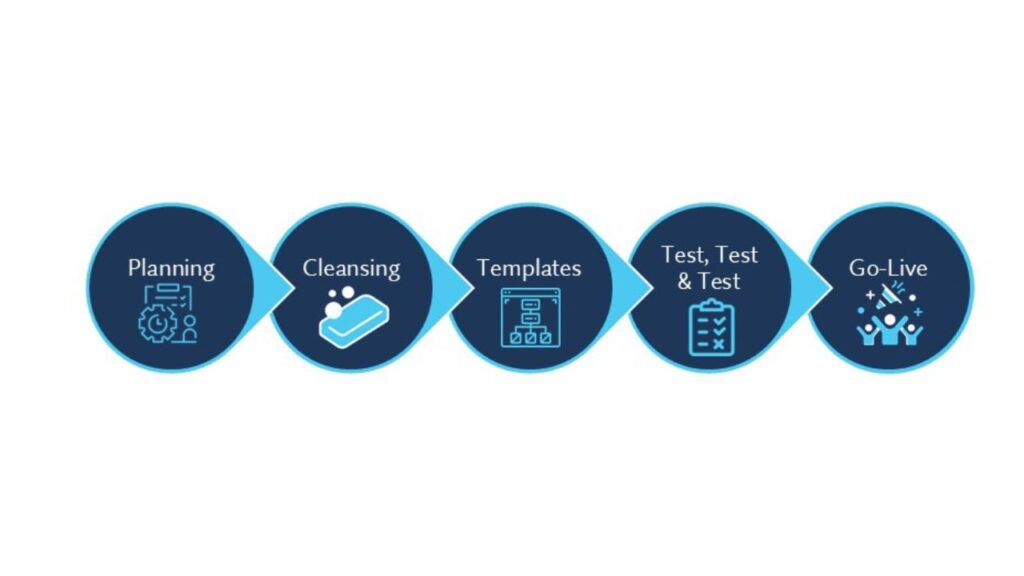
Here are five key steps:
My mother always used to say, “Measure twice, cut once.” In a complex process like data migration, this sentiment applies, and planning should begin as early in the project as possible with the relevant team members assembled.
The plan should include a complete assessment of the current system’s master data records (such as Customer Master records, Vendor Master records, Item Master records, and Fixed Asset Master records), the fields involved, and how they correspond to the new system’s fields to ensure they are correctly matched for transformation. It should also cover the volume of migrated data and the quality of the existing data.
Initially, the goal is to filter out excess data and define the data required to run the new system. At this stage, it is essential to understand the similarities and differences between the legacy and new systems, particularly in how they process data. Keeping the end point in mind, understanding these differences helps with mapping source to target, identifying gaps in the data, and defining approaches to address them. It also allows consideration of how new reports will look with the transferred data and how it may affect any upstream interfaces.
The final point to mention here is that once these aspects have been covered, the plan can be measured by estimating the resources needed for the data migration elements and setting deadlines for when migration must be completed.
Use the opportunity to clean up your data. Don’t just load in the same old data from your old system that has not given you the information you want. Over time, a business can accumulate large amounts of unstructured data; it can be outdated or even irrelevant to the new system.
Details on master records and how the data on them will be used to give information in your new system should be considered during the migration from the planning stages. Make sure to remove duplicated data, correct inaccuracies and fill in missing values.
Another important aspect to consider is the mechanism by which data transformation takes place. For a Dynamics 365 migration, Excel functionality can be used to perform the transfers. However, the templates provided to the customer must be thoroughly mapped so that fields transfer with accurate data.
Failing to test the migration process leaves you open to unexpected errors. You can identify potential issues early by performing multiple test runs at different stages.
Your plan should include several stages of testing. For example, master data records can be loaded early in the process, followed by introducing data such as journal entries from trial balances and fixed assets during CRP and testing phases. This approach allows the data migration team multiple attempts to perfect the loads while providing the testing teams with familiar data, making the process more intuitive than using randomly generated transactions.
I find that scheduling a full data cutover rehearsal around the UAT phase of the project is beneficial. This helps gauge the time required for the entire extract-transform-load process, which is crucial for a Big Bang approach where system downtime must be minimised.
The first job of the day is to ensure that a backup of everything is in place. If something goes wrong, you need the ability to roll back and start again. However, with a solid plan and plenty of rehearsals, the process should not be stressful.
The final day is about crossing the t’s and dotting the i’s. Extract and transform the data, allow the team to check values one last time for accuracy, and then load. The most important element of migrating on the day is ensuring proper sign-offs by the customer.
For example, I like to generate an aged debtor balance report from both the legacy and new systems and ensure that a responsible person from the customer, along with the person who performed the data loads, signs off on it. This creates a tangible record for auditors, who will scrutinise the cutover records during any audits.
We hope to have provided you with more perspective if you are considering a digital transformation project and make you consider giving the data migration element the importance it deserves within the project.
Some key points to remember:
If you are thinking about a new ERP system or upgrading existing AX software to D365, or have D365 already and just feel you could be getting more out of the system, please feel free to contact us. We would be delighted to speak with you.


